
Native, not another Electron app
A SwiftUI window and menu-bar item sharing one core with the CLI. Small binary, fast launch, no web runtime.
Remige watches Homebrew, npm, pnpm, Bun, Sparkle apps, the Mac App Store, and the command-line tools you installed with curl. One list. Release notes. One click.
curl -fsSL https://remige.app/install.sh | shFree · MIT · No account · No background daemon
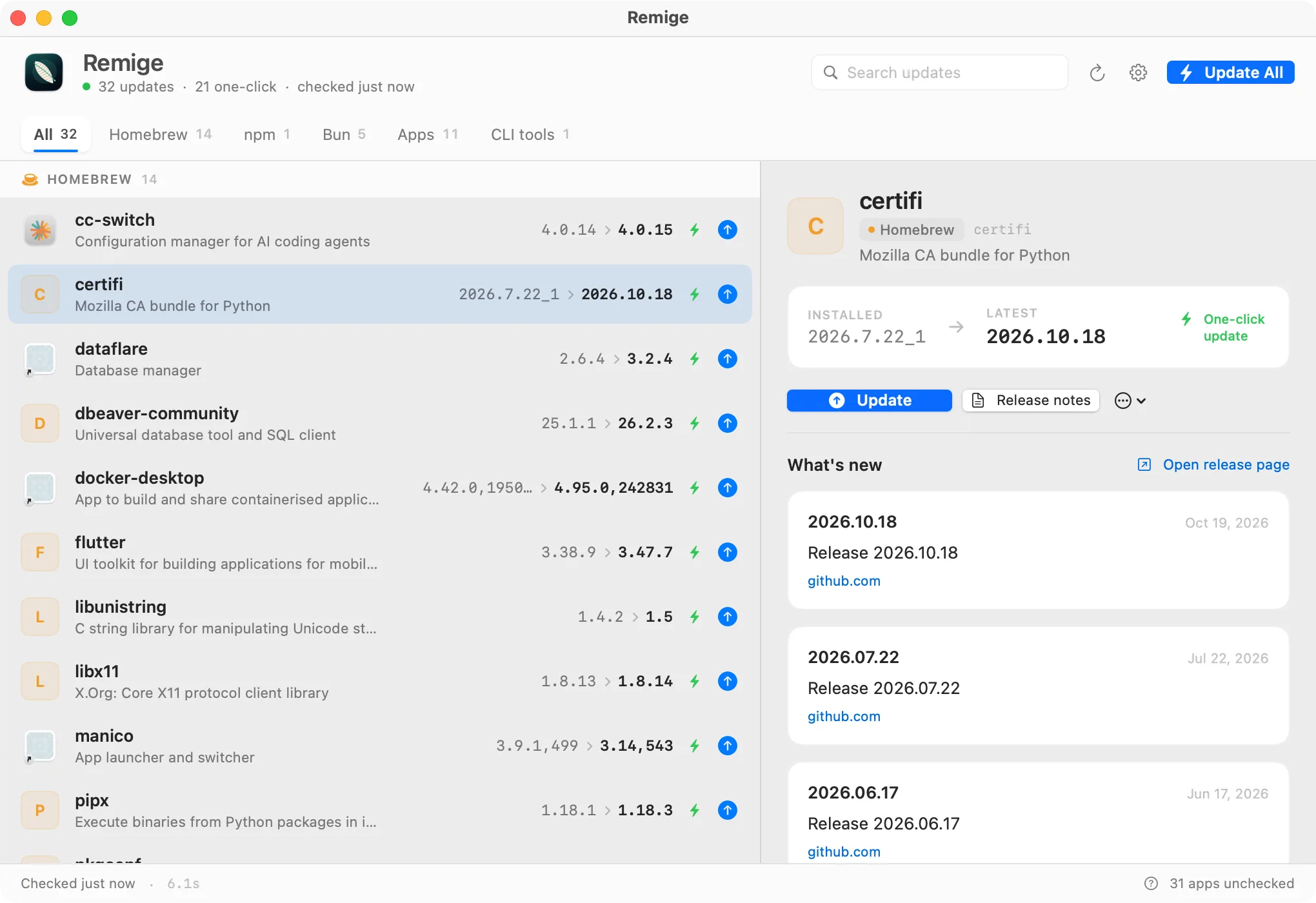
Updaters are fragmented. Remige runs the native sources in parallel, deduplicates the results, and gives every row a safe, visible next step.
A SwiftUI window and menu-bar item sharing one core with the CLI. Small binary, fast launch, no web runtime.
Homebrew, npm, pnpm, Bun and mas run their own commands. Download-only apps open the full release, never a silent bundle swap.
GitHub release notes and Sparkle appcast notes are fetched and cached, so you know what changed before you click.
remige list --json, remige upgrade --all --dry-run, remige changelog iina. Stable IDs for scripts.
No account, no analytics, no daemon. The last scan is cached for instant paint; a failed source never blanks the list.
Declare a curl-installed tool with a version command, a GitHub repo and an optional self-update command.
If a manager is not installed, its source is skipped automatically.
Formulae and casks, including --greedy auto-updating casks and pinned packages.
Global packages only, with the registry as the source of truth.
Reads real SUFeedURL appcasts. Honours channels and minimum macOS; ignores delta-only payloads.
When mas is installed, App Store updates join the same list.
A curated catalog for uv, Claude Code, rustup, ripgrep, gh and more — plus your own declarations.
Reads Electron Builder app-update.yml (GitHub or HTTPS manifests) and bundle-id catalog entries such as magpie. Homebrew keeps ownership when it installed the app.
Apps with no Sparkle feed, Homebrew cask, recognized Electron manifest, or explicit catalog entry are listed as unchecked, never guessed. That is deliberate: no silent bundle replacement.
The app and the CLI share every detector, cache and upgrade plan. JSON output is stable; upgrade commands are shown before they run.
$ remige list
remige 0.4.0 · just now

HOMEBREW
  cc-switch      4.0.14  →  4.0.15  auto
  sqlite         3.54.0  →  3.54.1  auto

NPM
  npm            11.20.0 →  12.2.0  auto

APPS
  IINA           1.4.4   →  1.5.0   open

22 updates · 19 one-click · scanned in 0.8s
macOS 14 Sonoma or newer. Apple Silicon and Intel are both in the universal build.
The normal route. Drag Remige into Applications.
Download DMGInstalls the app and CLI, verifies SHA-256.
curl -fsSL https://remige.app/install.sh | shHomebrew keeps the CLI and cask up to date.
brew tap nichenqin/remige https://github.com/nichenqin/remige
brew install --cask remige-app
brew install remigeReleases are built and checksummed on GitHub Actions. Developer ID signing and Apple notarization are wired into the release pipeline but require an Apple Developer Program membership; until those credentials are provided, macOS may show a Gatekeeper prompt. The installer clears the quarantine flag for you. Details: security page.
No. It runs the package manager's own upgrade command and shows the exact argv first in the CLI. Sparkle apps that are not cask-managed open the full download; Remige never replaces an app bundle behind your back.
No account. Remige never injects sudo. If a Homebrew cask or mas needs elevation, the tool reports its own error. Everything runs as your user.
They are checked from standard Electron Builder manifests, a bundle-ID catalog entry, or an appUpdates config entry. Nothing is inferred from the display name. Apps managed by Homebrew are covered by the cask source.
No analytics, no accounts, no background daemon. Network requests go only to the package managers, registries, appcast feeds and GitHub release pages needed for the scan.